Join our community to stay updated.
Join our community to stay updated.
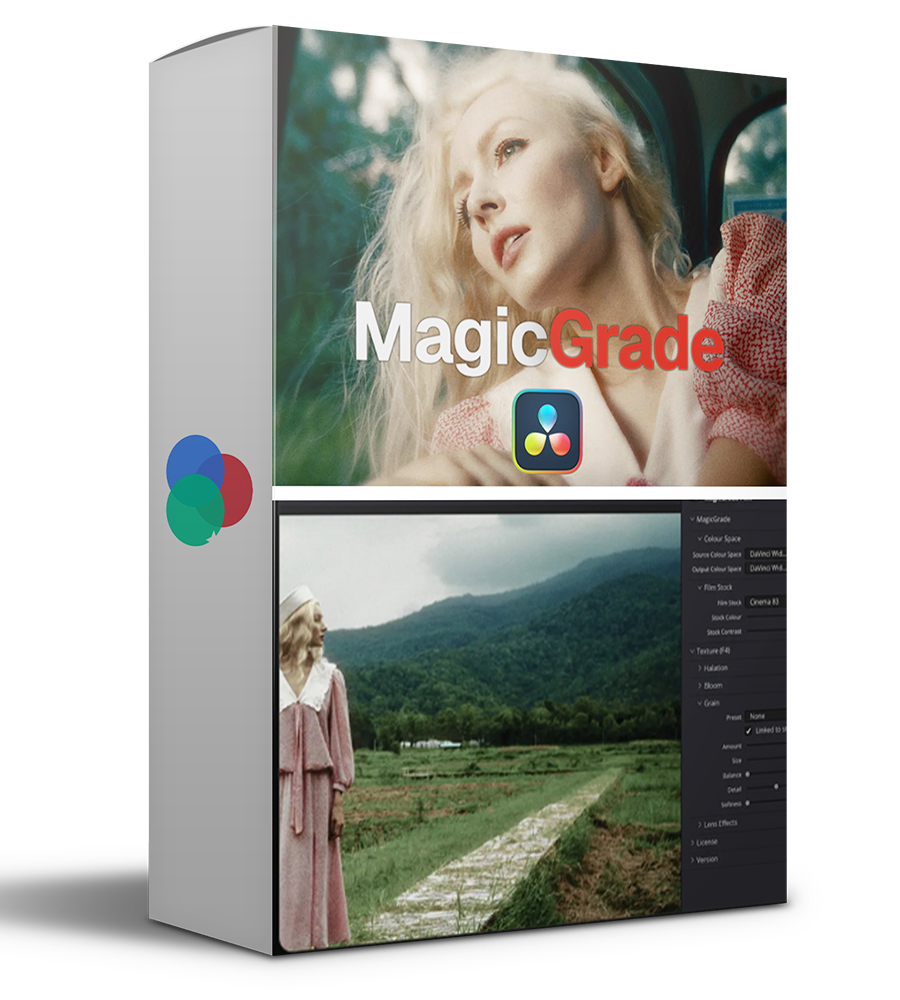

In the demanding world of video production, achieving a professional cinematic look often requires complex color grading techniques and extensive knowledge of advanced software. Many editors struggle with time-consuming node trees and intricate adjustments, hindering their creative flow. Enter the MagicGrade Davinci Plugin by MrAlexTech, an innovative OFX plugin meticulously designed to streamline your post-production workflow within DaVinci Resolve. This powerful tool demystifies the art of color, offering an intuitive, fast, and highly effective way to transform your digital footage into stunning, film-like masterpieces. Whether you’re a seasoned colorist or new to video editing, MagicGrade empowers you to achieve breathtaking results with unprecedented ease, making it an essential addition to any DaVinci Resolve toolkit.
At the heart of the MagicGrade Davinci Plugin by MrAlexTech lies its groundbreaking film emulation engine. Forget “filmic-ish” presets; MagicGrade provides access to 40 meticulously crafted film stocks, each built from real film data. This means authentic color response, precise contrast curves, and natural grain profiles are applied with a single click, instantly elevating your footage beyond its digital origins. From vibrant slide films like Astra 100 and Lumina Vivid to classic negative stocks such as Cinema 83 and Vantage 100, and even a diverse range of monochromatic options, MagicGrade ensures your images tell a more compelling story. Each stock dynamically adjusts its grain profile, delivering fine detail for lower ISOs and lively textures for pushed films, eliminating guesswork from your film emulation process.
Beyond film stocks, MagicGrade introduces advanced Colour Space Transforms (CST). This feature liberates you from the complexities of a color-managed timeline. Simply inform MagicGrade of your camera’s input (be it S-Log3, Log-C, V-Log, R3D, or others), and the plugin automatically ensures the chosen film stock renders exactly as intended. This seamless integration allows you to focus purely on creative choices, making cinematic look creation more accessible than ever before.
The MagicGrade Davinci Plugin by MrAlexTech redefines the color grading experience with its exceptionally intuitive interface. Designed for use directly on the edit or color page, it features on-screen controls that let you drag and adjust elements like color, contrast, density, and saturation directly on your preview monitor. This eliminates the need for complex node graphs or fiddly tiny dials, allowing for a more organic and visual approach to color grading.
Key controls offered by this powerful OFX plugin include:
Underpinning these user-friendly controls is serious color science. MagicGrade employs a linear gain exposure for natural brightness adjustments, a tetrahedral color warper for clean, artifact-free hue shifts, and filmic saturation that enriches colors authentically, mirroring how real film responds to light. This ensures that every adjustment made with the MagicGrade Davinci Plugin by MrAlexTech yields professional-grade results.
The magic of film often lies in its subtle imperfections and textures, elements expertly replicated by the MagicGrade Davinci Plugin by MrAlexTech. Enhance your video editing with a comprehensive suite of finishing touches that instantly add character and depth:
* Lens Blur: Mimic the gentle softness found at the edges of vintage primes, keeping your center crisp.
* Chromatic Aberration: Add a touch of subtle red/cyan fringing at the edges, lending a “photographed” feel to otherwise sterile digital footage.
* Lens Distortion: Apply a touch of barrel or pincushion distortion to remove the harsh digital edge, injecting instant character.
These elements combine to give your footage a unique identity, crucial for distinct post-production aesthetics.
Understanding that every editor has a unique workflow, the MagicGrade Davinci Plugin by MrAlexTech offers unparalleled flexibility. For those who prefer working within DaVinci Resolve’s traditional node tree, the new MagicGrade Film is a streamlined companion. This stripped-back tool provides just the Colour Space Transform, the 40 Film Stocks, and Texture effects, allowing you to integrate the authentic film look at the end of your existing grade without disrupting your custom node structures.
Installation is remarkably simple: download, run the installer, and MagicGrade automatically appears in your DaVinci Resolve effects library. For moments when you need a quick reminder, the integrated F5 Quick Help provides instant explanations for every control, directly within the plugin, negating the need for external manuals. The plugin is GPU accelerated (CUDA + Metal) for rapid performance and supports both Windows and macOS (including Apple Silicon native systems), ensuring broad compatibility. Best of all, it works flawlessly with both the Free and Studio versions of DaVinci Resolve.
The MagicGrade Davinci Plugin by MrAlexTech is more than just a tool; it’s a gateway to effortless color grading and stunning film emulation. It provides a comprehensive solution for filmmakers, videographers, and content creators looking to infuse their work with a professional, cinematic look without the steep learning curve. This OFX plugin offers an exceptional value proposition:
Transform your digital footage into compelling visual narratives. The MagicGrade Davinci Plugin by MrAlexTech empowers you to create captivating imagery, bringing your creative vision to life with unprecedented speed and simplicity. Don’t miss out on the early adopter price of $69.99 (normal price $99.99 USD) and start your free 7-day trial today!
If you’re looking to expand your toolkit further, explore our full range of creative downloads in this category. For more details from the original creator, you can visit the official sales page.